Chapter 21
How Do I Write the Roles and Responsibilities Section of the SSP?
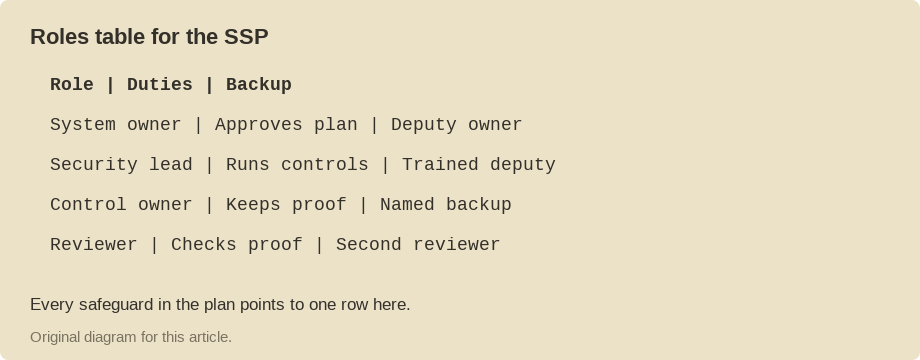
An assessor who cannot find an owner will doubt the safeguard. A control with no named owner looks unwatched, even if the technology is sound. The roles section fixes that problem in one place.
SSP means System Security Plan. CMMC means Cybersecurity Maturity Model Certification. CUI means Controlled Unclassified Information. NIST SP 800-18 Revision 1 guides security plan writing for federal systems. A security plan describes the system, its boundary, and the controls that protect it. The roles section names who runs, checks, and approves each part of that plan.
Write one table, then refer to it everywhere
Put a single roles table near the front of the SSP. Give each row four fields: role title, duties, backup person or role, and approval scope. Keep role titles stable, even when staff change. A stable role title lets the rest of the SSP refer to the role. Staffing changes then need no rewrite of every section.
Use at least four roles. The system owner approves the plan and accepts residual risk. The security lead runs day to day controls and tracks fixes. Each control owner keeps proof for one set of safeguards. A reviewer checks proof before an assessment. Add more roles only when a duty truly belongs to no existing role. A table with thirty roles helps no reader.
After the table, refer to roles by title in each control description. Write "the control owner reviews access monthly" rather than repeating a job description each time. If a control description names a person who later leaves, that section goes stale. A role reference stays correct as long as the table stays current.
Define duties in verbs, not titles
A role title alone proves nothing. Duties must state what the role does, in verbs a reader can check. "Owns access control" is too vague to check. "Reviews the access list monthly and removes stale accounts within five days" can be checked against records. Write each duty so an assessor can ask for the record that proves it.
Separate three kinds of duties in the table. Operating duties run the control each day or each month. Review duties check that the control worked. Approval duties sign off on the plan or on a change. One person should not hold all three kinds for the same control. If the same person operates and approves a control, say so, and name the reviewer who checks that work. Assessors look for that separation.
Name a backup for every role
Every role needs a backup, named in the table. A control with one knowledgeable person and no backup fails when that person is away. The backup does not need the same depth of skill on day one. The backup does need training, system access, and a written handover note. State the backup training in the table, in one short phrase per role.
Update the table when staffing changes. A roles table that names a person who left six months ago damages trust in the whole SSP. Review the table at least once a quarter. Review it sooner after any departure or reorganization. Keep a version note with the date of the last review. A reader can then see the table is current.
Link roles to approval
Close the section with the approval record. State who approved the SSP, the date of approval, and what was approved. The system owner normally approves the plan. Record that approval as a signature and a date, not as a vague statement that the plan was approved. If approval covers only part of the plan, state which part. A partial approval with clear scope beats a blanket claim that hides gaps.
Check the section before you submit. Read each control description and ask who owns it. If the answer is not in the roles table, add the role or fix the description. If a role in the table owns nothing, remove it or give it a duty. A roles section where every role owns something reads as a real plan. The same holds when every safeguard has an owner.
Next step
PolicyCortex collects evidence from live Azure configuration using 33 collectors. The collectors read conditional access, diagnostic settings, Defender posture, backup, and firewall. The evidence is evaluated against NIST 800-53 and NIST 800-171. It supports re-verification after remediation. It generates SSP, SAR, and POA&M output from collected evidence. SAR means Security Assessment Report. POA&M means Plan of Action and Milestones. PolicyCortex is strongest in commercial Azure, and AWS is covered. Start at https://policycortex.com.
Sources
- NIST SP 800-18 Revision 1, Guide for Developing Security Plans for Federal Information Systems, National Institute of Standards and Technology. https://doi.org/10.6028/NIST.SP.800-18r1
- NIST SP 800-171 Revision 2, Protecting Controlled Unclassified Information in Nonfederal Systems and Organizations, National Institute of Standards and Technology. https://doi.org/10.6028/NIST.SP.800-171r2
- 32 CFR Part 170, Cybersecurity Maturity Model Certification (CMMC) Program, U.S. Department of Defense, eCFR. https://www.ecfr.gov/current/title-32/subtitle-A/chapter-I/subchapter-G/part-170