Chapter 29
How Do I Document Requirements That Do Not Apply to Us?
You found a requirement that seems to fit another kind of system, not yours.
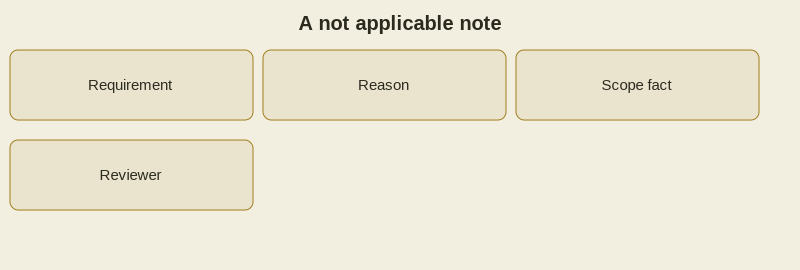
SSP means System Security Plan. CMMC means Cybersecurity Maturity Model Certification. CUI means Controlled Unclassified Information. Your SSP describes each safeguard for your system. A requirement that does not apply still needs a written note. Silence looks like a gap. A clear note shows you considered it.
When not applicable is a fair claim
A requirement is not applicable only when its scope fact is true for your system. Scope fact means a checkable fact about your system, not a preference. Your system holds no wireless access points. Your system uses no portable media. Your system has no public web service. Each of these is checkable.
Hard work does not make a requirement vanish. Cost does not make a requirement vanish. Staff size does not make a requirement vanish. A tool you do not own does not make a requirement vanish. If the scope fact is false, the requirement applies, even if meeting it takes work.
The four parts of a good note
First, name the requirement and its plain title. Second, state the reason it does not apply in one clear sentence. Third, give the scope fact that proves the reason. Name the system part, or the absence of it, that you checked. Fourth, name who reviewed the note and the date of that review.
Here is a plain example. Requirement 3.8.3 covers media marking. Your system stores CUI only on managed servers. No portable media ever holds CUI. Your media policy bans portable media for CUI. The reviewer checked the policy and the server list on a set date. That note can be checked. An assessor can test it.
What assessors test in a not applicable claim
Assessors test the scope fact, not your confidence. If you claim no wireless access, they may ask for a network scan. If you claim no portable media, they may ask for device logs. If you claim a service does not exist, they may ask for an inventory that proves its absence.
Keep the proof beside the note. Link the SSP section to the policy, the inventory, or the scan that backs it. If the scope fact changes later, update the note at once. A system that gains wireless access gains the wireless requirement with it. An old not applicable note then becomes a false claim.
Mistakes that turn a good note into a finding
Do not mark a whole control family not applicable without checking each requirement inside it. Families hold many requirements. One may not apply while the rest do. Do not copy a not applicable note from another company. Their scope facts are not yours. Do not leave the reviewer unnamed. An unreviewed note reads like a guess.
Review every not applicable note at least once a year. Review it again after any system change. A note that survives review is strong evidence. A note that no one reviewed is a risk you chose not to see.
Sources
- NIST SP 800-171 Revision 2.
- NIST SP 800-171A.
- NIST SP 800-18 Revision 1.
- Original diagram by PolicyCortex.
Next step
Want evidence tied to each SSP section from live systems? See how PolicyCortex collects it.